• Skip to primary navigation
  • Skip to main content
  • Skip to primary sidebar
  • Skip to footer

Retro Rendezvous

Connect, Collaborate and Code

  • Home
  • Recommended Resources
  • About Me
  • Contact Me
  • en EN
    • en EN
    • es ES

Paul Bussey

Exploring Wilderland – Map of the Game

January 16, 2026 by Paul Bussey

Google AI Studio has helped me create an exact map of my Exploring Wilderland game.

This includes the starting positions of the NPCs as well as the objects. I say “starting” since NPCs can pick up objects and randomly drop them again. Not all the NPCs move in the game.

https://retrorendezvous.org/wp-content/uploads/2026/01/TheHobbitMapEnglish-scaled.png

Here’s the equivalent map in Spanish:-

https://retrorendezvous.org/wp-content/uploads/2026/01/TheHobbitMapSpanish-scaled.png

Filed Under: BASIC Programming, BBC Micro B

The Hobbit : Exploring Wilderland Completed

January 7, 2026 by Paul Bussey

This is the final version of “Exploring Wilderland” – a BBC BASIC game based on the original “The Hobbit” text adventure game by Melbourne House

This is running in Owlet, so you’ll need to click into the righthand window in order to start typing commands for the game.

Click HERE to run in Outlet

After some battling with logic bugs and memory management, I’m happy to share the working version of Exploring Wilderland.

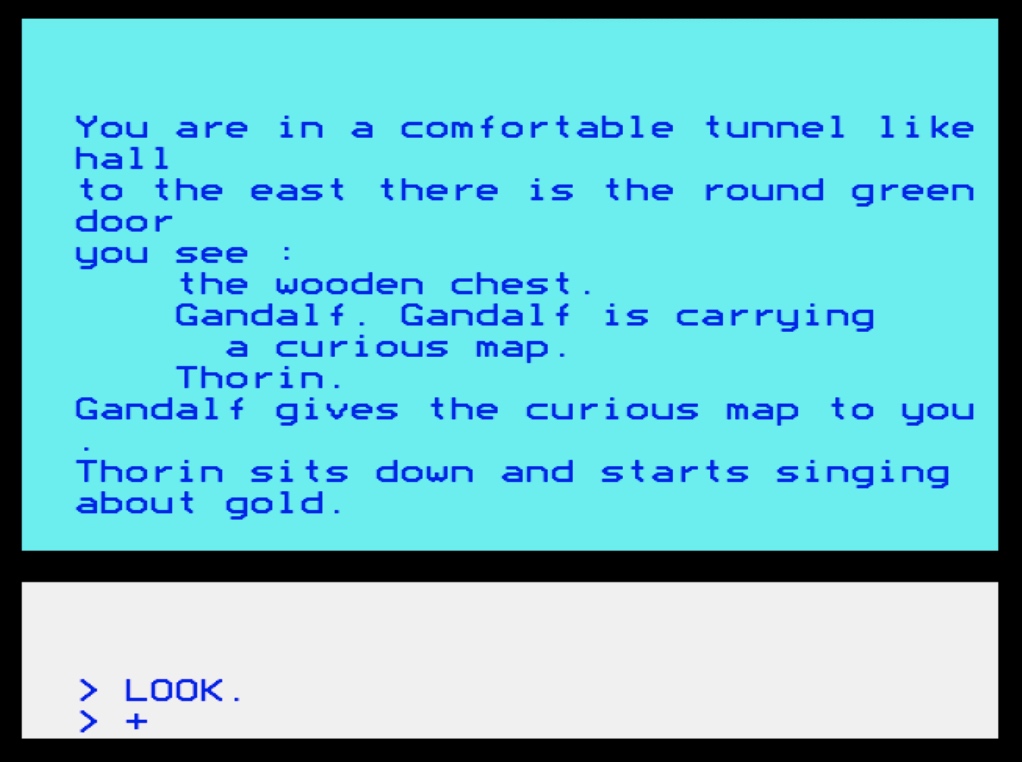
This is a text adventure running in Mode 7 on a standard BBC Model B. While it looks like a standard adventure on the surface, underneath it’s running a simulation where NPCs (Thorin, Gandalf, Goblins, etc.) are actively competing with you.

Here is the rundown on how to play and a look under the hood for those interested in the code.

How to Play

The Objective:

The game has 10 valuable treasures scattered across 52 locations (from Beorn’s House to the Lonely Mountain). To win, you must find and TAKE all 10 items. Once your inventory holds every treasure, the game detects this and you win.

The Catch:

You aren’t alone. There are a number of NPCs (12 altogether) with some of them wandering the map. They will move between locations, open and close doors, and—most importantly—pick up and drop items. If you can’t find the Valuable Treasure, chances are a goblin (or even Thorin) has picked it up and walked off with it! You might have to follow them and wait for them to drop it.

Commands

The parser is designed for speed. You can abbreviate almost all commands.

The parser is quite basic, so if you use backspace or delete, it won’t recognise a command. Try and get commands typed in right first time!

Navigation: N, S, E, W, U (Up), D (Down), NE, SE, etc.

Interaction:

OPEN (or O): Opens a door if one is present.
CLOSE (or C): Closes a door.
TAKE (or T): Note: This command takes ALL loose objects in the current room. You do not need to type the noun (e.g., just type T, not TAKE SWORD).
DROP (or DR): Drops ALL items you are currently carrying.

Info: LOOK (L), INVENT (INV), SCORE (SC), HELP (H).

Strategy: WAIT (or WA). This passes time without moving, allowing you to see NPCs enter/leave or interact with the room. JUMP (or J) allows you to jump to a random location in the game.

Further Help

The map pretty much follows the original Hobbit text adventure, but the more random parts of the map (stuck in Goblins caves) have been toned down.

You can see the original “Guide to Playing the Hobbit” by Melbourne House to get a sense of all the locations. The location numbers in my game (in the DATA statements) match the location numbers in the book, so if you get lost, then the guide will be invaluable.

Click here for Guide to Playing the Hobbit PDF

Code Insight Under the Hood

For those looking at the listing, here is how we managed the memory on the Model B:

  1. Data Type Optimization

We were hitting memory limits, but rather than making the code unreadable by renaming every variable to A$ or X%, we optimized the data structures.
Originally, door statuses (“Open”/”Closed”) were stored as strings. We converted this to an Integer array (doorStatus%), which saves bytes for every door and is faster to process. We also stripped REM statements to claw back space.

  1. The “Living” AI (PROC_NPC)

The heart of the simulation is in PROC_NPC. Every turn, each NPC rolls a die:
They have a chance to OPEN or CLOSE a door if they are near one.
They have a chance to TAKE items if present, or DROP items if they are carrying them.
They attempt to move to adjacent rooms using the same exit data the player uses.

  1. Two-Way Door Logic

A tricky bug we solved involved doors. In many adventures, opening a door only updates the room you are standing in. In this game, PROC_OpenDoor and PROC_CloseDoor instantly calculate the location on the other side of the connection and update the exits for both rooms simultaneously. This means if Gandalf opens a door from the inside, you can walk in from the outside immediately.

Tweaking the Game

If you paste the code into your emulator and want to mess around, here are the key lines to look at:

Line 280 – Sets the starting location (normally set to 6) – so you can get the game to start in locations 1-52

Change the AI Personality (Line 924)

Currently, the code is: 924 action=RND(4)
This gives NPCs a 25% chance to try Opening, Closing, Taking, or Dropping.
Change it to RND(10) to make them less hyperactive (they will mostly just walk around).
Change it to RND(2) if you want a chaotic game where doors are constantly slamming shut!

Change the Win Condition (Line 670)

Currently, you need all 10 items (LEN(Inventory$)/2=NoOfObj%). You can lower this number if you want a quicker game.

I hope you enjoy exploring Wilderland!

Filed Under: BASIC Programming, BBC Micro B

The Hobbit : Exploring the Wilderland

February 19, 2024 by Paul Bussey

My next BASIC coding project is to squeeze a very simplified version of the classic text adventure game “The Hobbit” by Veronika Megler, Philip Mitchell and David Johnston into a BBC Basic program. This would be for a 32K BBC Model B. I’ll be using the Owlet editor in the main and cross checking the code on my own BBC Micro.

See this Stardot forum post for progress on this project

Like many of you, I enjoyed this landmark game and it stuck in memory. I coded some of my own text adventures at the time and was fascinated with the process….certainly nudging me towards a database programming career later on in life. Let me know some of your own memories, experiences with this game – I’d like to hear them.

This project is mostly for nostalgia, but also taking on the challenge of squeezing a very simplified form of this landmark game into a BBC Basic version. Like many retro coding projects you think …. “Why not?”

My objectives are:-

1. To represent every location in the game in BBC basic, using tokens for the common words to save space.
2. To navigate between all the locations using the original mappings (though I may exclude the random-like maddening mazes such as the Dark Stuffy Passage)
3. To emulate the split screen user interface that the Hobbit had, with input text in the bottom quarter of the screen and output text in the top.
4. To keep everything in one program, not reading other files.

If there’s any memory left (I’ll use MODE 7) then we’ll see what else could be added. It would be fantastic to include NPCs wandering around the game map randomly, such as Thorin and/or Gandalf, so you could meet them as you wander.

My objectives are not:-

1. To have a clever parser. It’s just to input directions, to allow an easy exploration of the Wilderland.

Resources

The book “The Guide to Playing the Hobbit” by David Elkan (which I used to own) which gives a great breakdown of the game (from the internet archive)
https://archive.org/download/guide-to-p … Hobbit.pdf

Veronikia Megler’s website (one of the original authors of the game) includes some really useful information:-
http://veronikamegler.com/WL/wl.htm

– A map
– Room Database dump of the locations
– Even a rudimentary Spectrum emulator, displaying the state of the elements in the game

Using ChatGPT (ver 4)

For this project I’ve been using ChatGPT to start to compile the word tokens and the locations converted into text with token indexes inserted. It’s done quite well with this. I asked ChatGPT to look at this list of locations and pull out all common words that are greater than two characters:-

Beorn’s house
The Bewitched gloomy place
A big cavern with torches along the walls
A bleak barren land that was once green
The cellar where the king keeps his barrels of wine.
A comfortable tunnel-like hall.
A dark dungeon in the elven king’s halls.
The dark stuffy passage
The dark winding passage
The east bank of a black river
The elven king’s great halls
An elvish clearing with levelled ground and logs
The empty place
The forest
A forest of tangled smothering trees
The forest road
The forest road
Forest river
The front gate of the Lonely Mountain
The gate to Mirkwood
A gloomy empty land with dreary hills ahead
The goblins’ dungeon
The great river
The green forest
The halls where the dragon sleeps
A hard dangerous path in the Misty Mountains
A hidden path with trolls’ footprints
Inside the goblins’ gate
A large dry cave which is quite comfortable
A little steep bay, still and quiet, with an overhanging cliff.
The Lonely Mountain
Long Lake
The mountains
A narrow path
A narrow dangerous path
A narrow place with a dreadful drop into a dim valley
Outside goblins’ gate
A place of black spiders
Rivendell
The ruins of the town of Dale
The running river
A smooth straight passage
A strong river
The treeless opening
The troll’s cave
The troll’s clearing
The waterfall
The west bank of a black river
The west side of Ravenhill
A wooden town in the middle of Long Lake

Common words (tokens) that ChatGPT found (here shown stored in DATA statements):-

800 DATA “the”,”with”,”river”,”forest”,”place”,”gate”,”path”,”dark”,”passage”
810 DATA “black”,”goblins'”,”narrow”,”gloomy”,”land”,”green”,”where”,”comfortable”,”dungeon”
820 DATA “elven”,”king’s”,”bank”,”great”,”halls”,”clearing”,”and”,”empty”,”lonely”
830 DATA “mountain”,”dangerous”,”mountains”,”cave”,”long”,”lake”,”town”,”troll’s”,”west”

…and the resulting location descriptions with indexes inserted representing the word token (this was also generated by ChatGPT):-

900 DATA Beorn’s house,01 Bewitched 13 04,A big cavern 02 torches along 01 walls,A bleak barren 14 that was once 15,01 cellar 16 01 king keeps his barrels of wine.
910 DATA A 17 tunnel-like hall.,A 18 dungeon in 01 elven king’s halls.,01 18 stuffy 09,01 18 winding 09,01 east 20 of a 10 03
920 DATA 01 elven king’s 22 halls,An elvish 24 02 levelled ground 24 logs,01 25 04,01 05,A 05 of tangled smothering trees
930 DATA 01 05 road,01 05 road,05 03,01 front 20 of 01 Lonely Mountain,01 20 to Mirkwood
940 DATA A 13 25 14 02 dreary hills ahead,01 goblins’ dungeon,01 22 03,01 15 05,01 halls 16 01 dragon sleeps
950 DATA A hard 18 20 in 01 Misty Mountains,A hidden 20 02 trolls’ footprints,Inside 01 goblins’ 20,A large dry 31 02 is quite 17,A little steep bay, still and quiet, 02 an overhanging cliff.
960 DATA 01 Lonely Mountain,Long Lake,01 mountains,A 12 20,A 12 18 20
970 DATA A 12 04 02 a dreadful drop into a dim valley,Outside goblins’ 20,A 04 of 10 spiders,Rivendell,01 ruins of 01 34 of Dale
980 DATA 01 running 03,A smooth straight 09,A strong 03,01 treeless opening,01 troll’s 31
990 DATA 01 troll’s 24,01 waterfall,01 west 20 of a 10 03,01 west side of Ravenhill,A wooden 34 in 01 middle of Long Lake

Location Exit Data

Each location has data in this format:-

“01202807506605103”

The first two digits are the location, followed by at least one group of 3 digits.

Each 3-digit block represents an exit, with the first digit for the direction (1 for North, 2 for Northeast, etc., 0 for Down, and 9 for Up) and the next two digits for the destination location number

I had ChatGPT read “The Guide to Playing the Hobbit” and had a go at creating the exit data, but it’s pretty bad – and this needs redoing by hand!

I need to:-

a) Resolve a bug with unpacking the room descriptions properly. It doesn’t convert the token value that lies at the end of a location description string into the corresponding word.
b) Go through all the exit data to check and replace as required (done)
c) Allow the input of directions to include shorthand as well as longhand for the directions (North and N for example).
d) Cross check the common word token replacements. I think ChatGPT has made some mistakes.

Filed Under: BASIC Programming, BBC Micro B

The Lords of Midnight : Landscaping

December 6, 2023 by Paul Bussey

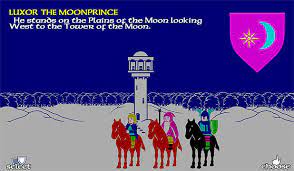
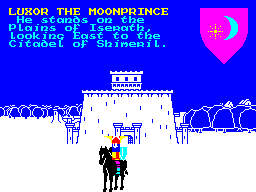
The Lords of Midnight was a popular and epic graphic adventure game by Mike Singleton for the ZX Spectrum (and other platforms – but not for the Beeb) originally released in 1984.

Here’s a few screenshots of what it looked like:-

Image
Image

I never completed the game but did remember these landmark graphics. The technique that the author Mike Singleton used was “Landscaping” – using scaled graphics shown as a first person perspective view. It was unique at the time – definitely moving computer graphics forward several notches.

The challenge I’ve set for myself is can this be done on the Beeb with Basic? I’m only interested in getting as far as having a grid of locations, the player being able to move in one of the 8 compass directions and having a simple landscape view implemented.

The code I have developed so far is in a link at the bottom of this post which includes:-

1) The player grid set up, currently 16 x 16. Each location has a number representing a tree or mountain or just an empty space. The player grid is displayed at the moment for diagnostic purposes, showing the position of the player, with a note at the top of the screen showing which direction the player is facing.
2) The player being able to look in one of the 8 compass directions (using numbers 1-8) and move with the key “m”.
3) Some procedures to draw scaled mountains and trees. (adapted from graphics code with thanks to Dominic Pajak) . The current code just shows a demo of these scaled graphics being used.

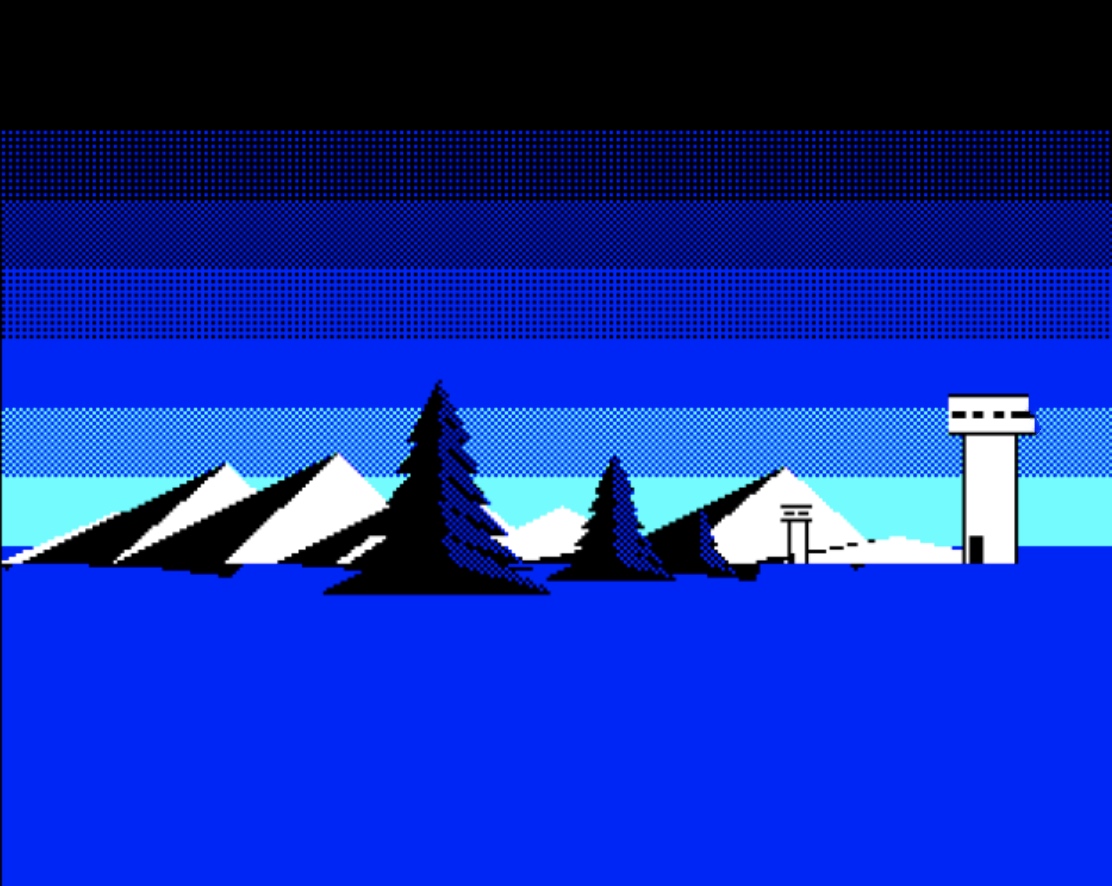
This is an example of scaled graphics I have developed so far. The tower from the code below has been removed for now to save memory.

Image

I have a Graphics Extension ROM (GXR) – so am using some of this extended command set in my code.

The big challenge is being able to represent the “landscaping” technique. I suspect this will be quite challenging squeezing it into memory, but I want to give it a go.

Luckily this technique is outlined in detail on this web page (see below), where Christopher John Wild has put a lot of work into understanding the game and breaking it down.

https://www.icemark.com/tower/landscaping.htm

Here’s my Mode 1 version, where I’ve gotten to the point with displaying three elements; mountains, trees and towers shown in a perspective mode. The player grid is shown as a 15 x 15 grid. Use N,E,S and W keys to face in different directions and the “M” key to move one square.

The following link will take you to the Owlet editor with the code.

This link is a post in the stardot forum outlining the progress of the code, with other forum members contributing and adding to the graphics.

This is the final version.

Filed Under: BASIC Programming Tagged With: Graphics

Notes on Owlet – A Modern BBC Basic Editor

November 24, 2023 by Paul Bussey

Owlet is a welcome modern editor for BBC Basic since editing Basic on the original BBC Micro was clunky and slow. Try it here with this example of “Space Probe” a game I’ve written recently.

A Trip Down Memory Lane

In a remarkable fusion of past and present, a trio of innovative programmers – Dominic Pajak, Matt Godbolt, and Kieran Connell – have breathed new life into a classic piece of computing history. Their project, the BBCMic.ro editor, also known as Owlet, is not just a nod to nostalgia; it’s a full-blown resurrection of the BBC Micro.

The Power of Emulation

The Owlet emulator is a marvel that runs BBC Basic right in your browser, encapsulating the essence of the original BBC Micro. But that’s not all – the team has also introduced the BBCMicroBot, a tool that can execute BBC Basic code and display the results in a tweet, merging the old with the new in a way that’s both ingenious and inspiring.

Inspirations and Creations

Dominic Pajak, in explaining the motive behind this project, said it was about “bringing back to life a classic 80s computer that inspired a whole generation in the UK.” This emulator has become a canvas for creativity, with users creating everything from pixel art to fractals. Notably, Raspberry Pi founder Eben Upton has even contributed an implementation of Conway’s Life in 6502 machine code, showcasing the emulator’s capability to handle complex computations.

A Platform for Experimentation

Pajak and his collaborators view this emulator as more than just a tribute to the past. They believe it encourages experimentation, much like Raspberry Pi and Arduino do for the current generation of developers. This philosophy is evident in the emulator’s design, which includes a 10GHz 6502 emulator on the backend. This feature dramatically accelerates the computing process, allowing users to accomplish in seconds what would have taken an entire night on the original BBC Micro.

The Best of Both Worlds

The BBCMic.ro editor and the BBCMicroBot represent a unique intersection of retro and modern computing. They offer a glimpse into the past while providing a platform equipped with the speed and efficiency of today’s technology. This project isn’t just about reliving old memories; it’s about creating new ones, using a piece of history as the foundation for new learning.

Some Discoveries

  • When running BBC Basic on this emulator, don’t forget to click into the right hand window in order to interact with the screen.
  • When using Random numbers in BBC Basic, the Owlet environment will end up giving you the same number on each run. When running the same code on a machine, random numbers behave better!
  • The GXR (Graphics Extension ROM) is standard in this emulator, which a normal BBC Micro B wouldn’t have. When I was using commands to draw circles or elipses, such as the planet in the graphic above, I wasn’t aware that this was an extended graphic command, so the code didn’t draw the planet at all on a native machine.
  • When clicking on items in the gallery of examples, they don’t seem to load and seem to suppressed by having your current coding project reload instead (this at least happens in the Chrome browser)
  • Owlet can contain the whole code of your BBC Basic program in a link – so easy to share your programming projects on a forum for example.
  • Owlet can save your code as a SSD (Disk image) ready to copy onto a USB memory stick, to be read by a GOTEK device. So Owlet is ideal for development and transfer of programs back to the original machines.

Filed Under: BASIC Programming

Solid State Storage for a BBC Micro

November 10, 2023 by Paul Bussey

My BBC Micro B came with a solid state storage device, allowing a Micro SD card to provide many of the original games published for the Beeb in the 80s. It was fantastic to have this included and great to have any of these games load in a split second. Fast, reliable solid state storage. No more dodgy tapes, floppies or clunky disk drives! The filing system code is supplied on EPROM – so taking one of the available ROM slots.

The solid state storage is known as MMC.

When I opened up the BEEB to see how the MMC SD Micro card was mounted I discovered this:-

The 1GB SSD card can be ejected, but the trouble is that there is a capacitor right next to it (as pointed out in the image) that prevents it from being pulled out of the slot. I haven’t tried that hard to do that, not wanting to risk damaging anything. But it’s pretty much blocked in.

It seems an odd mounting position that prevents the SD card from being taken in or out. Perhaps it’s the only sensible place where it can be mounted.

My objective at the end of the day is to have an easy and accessible way to transfer files between a Macbook Pro (where I could create programs for a BBC B on an emulator) and the Beeb but the current MMC facility doesn’t look to serve me for this.

Plus how robust would an SD card be being pulled in and out from this board multiple times? It wasn’t made for this kind of use I suspect. Plus it was the pain of lifting off the computer cover every time I needed to transfer the file, even if the MMC SD card was mounted in a different place.

In the end I decided to gain a GOTEK device from RetroClinic.com (see the eBay shop site as well) This is a USB Floppy emulator drive, where you could store hundreds of floppy disc images on one USB stick. A GOTEK device can be used with various retro machines, but this example has been especially configure for use with BBC Micro / Master / Electrons. This is the later type AT435 GOTEK USB Floppy emulator, equipped to connect to the Disk Interface port. This version has a faster CPU with more memory, and a larger 3 line screen, to make seeing the image and folder details easier

A selector on the front of the GOTEK allows you to choose and mount your floppy disk. It’s an external device that you can sit on top of your BBC Micro. The USB stick allows you to easily copy SSD (Disk files) from a PC or MAC which can be read straight away by the BEEB.

Best of all RetroClinic provides a preformatted Sandisk USB stick with many games and utilities for multiple Acorn machines.

For example the Owlet BBC Basic online editor, has a built in option to write your code to an SSD disk file – ready to transfer to a USB stick. It’s a great solution for allowing you to do most of the editing and testing of code on a modern machine and then finally doing final tweaks and RUNs on the BBC Micro.

Filed Under: BBC Micro B, Hardware Accessories Tagged With: GOTEK, MMC

  • « Go to Previous Page
  • Go to page 1
  • Go to page 2
  • Go to page 3
  • Go to Next Page »

Primary Sidebar

Recent Posts

  • 2026 03 : Falkirk, Business Hub – The I.T. Crowd (Scotland)
  • Riddles in the Dark : Goblin Cave Adventure
  • 2026 03 : Cordoba, La Zona – Retrobytes Mini Meetup
  • Mythic Map
  • 2026 01 : Falkirk, Business Hub – The I.T. Crowd (Scotland)
  • 2026 01 : Cordoba, La Zona – Retrobytes Mini Meetup
  • Exploring Wilderland – Map of the Game
  • The Hobbit : Exploring Wilderland Completed
  • The Hobbit : Exploring the Wilderland
  • The Lords of Midnight : Landscaping
  • Notes on Owlet – A Modern BBC Basic Editor
  • Solid State Storage for a BBC Micro
  • Programming Project : Space Probe
  • Using a BBC Micro B with an HDMI Monitor
  • Acquiring a 40 year old refurbished BBC Micro B Computer

Footer

The Venue

We meet at the Falkirk Business Hub.

Learn more about it here

The blog

Learn about my “rediscovery” of the BBC Micro B here in my blog

Recommended Resources

As I discover them I’ll be logging useful resources for Acorn machines HERE.